DELL H127Y Monitor P2425HSAP 884116468684
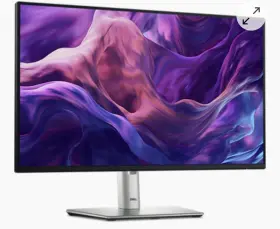
( Brand: Dell ), ( Manufacturer Part Number: H127Y ), ( Model: P2425HSAP ), ( Brightness: 250 Cd/m Sup 2 /sup ), ( Refresh Rate: 100 Hz ), ( Response Time: Ms ), ( Screen Coating: Anti-glare With 3h Hardness ), ( Swivel Angle: 45 Sup /sup / 45 Sup /sup ), ( Pixel Per Inch: 92.53 ), ( Display Type: Lcd ), ( Cables Included: 1x Power Cord /li Li 1x Dp-to-dp Cable, 1.8m /li Li 1x Us ), ( Color Gamut: 99 Srgb ), ( Screen Size: 23.8 ), ( Display Position Adjustments: Height, Tilt, Swivel, Pivot ), ( UPC: 884116468684 ), ( Dimensions: Wxdxh ), ( Tilt Angle: 5 Sup /sup / 21 Sup /sup ), ( Pixel Pitch: 0.2745 Mm X 0.2745 Mm ), ( Type: Monitor ), ( Maximum Resolution: 1920 X 1080 ), ( Panel Type: In-plane Switching ), ( Connectivity: Displayport, Hdmi Standard ), ( Color Support: Up To 16.7 Million Colors ), ( Gaming: False, Yes, No ), ( Backlight Technology: Led Edgelight System ), ( Product Line: Dell P )
Review DELL Monitor
The Dell P2425H monitor is a 24-inch Full HD (1920 x 1080) display that offers a crisp and vibrant viewing experience. Featuring an In-Plane Switching (IPS) technology panel, this monitor delivers impressive color accuracy and wide viewing angles, ensuring that text and images appear sharp and true-to-life from virtually any angle.
The sleek and modern design of the Dell H127Y monitor is complemented by its thin bezel, making it an excellent choice for multi-monitor setups. It boasts a stylish stand that provides tilt, swivel, and height adjustments, enabling you to easily find the most comfortable viewing position.
The monitor's connectivity options include HDMI, DisplayPort, and VGA, giving you flexibility when it comes to connecting multiple devices. It also features a built-in USB hub with two USB 2.0 and two USB 3.0 ports, allowing you to charge and connect peripherals with ease.
The Dell P2425H monitor is energy efficient, with an ENERGY STAR certification and a low power consumption mode, making it an eco-friendly choice for your workspace. Additionally, it comes with various display modes, including a customizable picture-by-picture (PBP) and picture-in-picture (PIP) feature, providing enhanced productivity for multitasking.
This Dell monitor is also equipped with a number of features designed to reduce eye strain and improve comfort, such as a flicker-free backlight, a ComfortView mode that reduces blue light emissions, and a low halo design that minimizes reflections.
In summary, the Dell P2425H monitor is a versatile and high-performance display that delivers stunning visuals, a sleek design, and a range of convenient features, making it an excellent addition to any office or home setup.
The Dell P2425H and Dell H127Y monitors are both 24-inch Full HD IPS displays from Dell, but they have some distinct differences that may influence your purchasing decision. Here are the pros and cons of each monitor:
Dell P2425H: Pros:1. IPS panel technology ensures wide viewing angles and accurate color representation.
2. Thin bezel design makes it ideal for multi-monitor setups.
3. Built-in speakers provide decent audio quality.
4. Ergonomic stand allows for height, tilt, and swivel adjustments.
5. Energy Star certified, which helps save energy and reduce environmental impact.
Cons:1. No USB-C input, which may limit connectivity for newer devices.
2. No built-in USB hub, which can be inconvenient for charging peripherals.
3. May not support HDR content, which can be a drawback for media consumption.
Dell H127Y: Pros:1. Affordable price point makes it an attractive option for budget-conscious buyers.
2. Thin and lightweight design makes it easy to move around or travel with.
3. Flicker-free and blue light reduction technologies help reduce eye strain.
4. Energy Star certified, which helps save energy and reduce environmental impact.
Cons:1. TN panel technology may result in narrower viewing angles and less accurate color representation compared to IPS panels.
2. Thinner bezel design on the sides but thicker on the top and bottom, which can affect multi-monitor setup aesthetics.
3. Limited adjustability, with no height, tilt, or swivel adjustments.
4. No built-in speakers, which may require additional expenditure on external speakers.
Conclusion:Both monitors offer their unique advantages and disadvantages. The Dell P2425H is a more premium option with a better display panel technology, more adjustability, and built-in speakers. However, it comes at a higher price point and lacks USB-C input and a built-in USB hub.
On the other hand, the Dell H127Y is an affordable option with a thin and lightweight design, energy efficiency, and flicker-free and blue light reduction technologies. However, it has a TN panel, limited adjustability, and no built-in speakers.
Based on the given information, if budget is a priority and you don't require advanced features, the Dell H127Y may be the better choice. However, if you're looking for a more premium display with better color accuracy and advanced features, the Dell P2425H may be the better option.
Recommendation:If you're looking for a budget monitor with basic functionality and energy efficiency, the Dell H127Y is a solid choice. However, if you're willing to invest in a more premium display with advanced features and better color accuracy, the Dell P2425H is the better option. Ultimately, the decision comes down to personal preferences and budget constraints.
Details:
Its 23.8 display offers a full HD resolution of 1920 x 1080, ensuring crystal-clear visuals. The IPS technology panel provides wide viewing angles, while the anti-glare coating with 3H hardness reduces screen glare and fingerprints, enhancing overall user experience. Experience a blend of performance and comfort with the Dell 24 Monitor - P2425H. This monitor is designed with user-friendly adjustments, featuring a height adjustable stand, swivel, tilt, and pivot capabilities to find the perfect ergonomic position.
With a sleek design, contrast ratio of 1,500:1, and brightness level 250 cd/m, its ideal for both productivity comfort in various work environments.
part #: h127y prices
- $134.99-$300.00
specifications pcoprojector:
- brand: Dell
- mpn: H127y
- model: P2425hsap
- brightness: 250 Cd/m Sup 2 /sup
- refresh rate: 100 Hz
- response time: Ms
- screen coating: Anti-glare With 3h Hardness
- swivel angle: 45 Sup /sup / 45 Sup /sup
- pixel per inch: 92.53
- display type: Lcd
- cables included: 1x Power Cord /li Li 1x Dp-to-dp Cable, 1.8m /li Li 1x Us
- color gamut: 99 Srgb
- screen size: 23.8
- display position adjustments: Height, Tilt, Swivel, Pivot
- upc: 884116468684
- dimensions: Wxdxh
- tilt angle: 5 Sup /sup / 21 Sup /sup
- pixel pitch: 0.2745 Mm X 0.2745 Mm
- type: Monitor
- maximum resolution: 1920 X 1080
- panel type: In-plane Switching
- connectivity: Displayport, Hdmi Standard
- color support: Up To 16.7 Million Colors
- gaming: False, Yes, No
- backlight technology: Led Edgelight System
- product line: Dell P
general pcoprojector:
- Computers/Tablet's Networking > Monitors, Projectors Accs > Projectors
- condition: New
offer pcoprojector:
- availability: In Stock
- options: Ship-to-home
- sold: 0
- quantity: 1
- started: March 9, 2025
seller pcoprojector:
- city: Denver, Colorado
- rating: 0.0%
- # reviews: 0
shipping pcoprojector:
- service: USPS Ground Advantage
- class: Standard
- transit: 4-10 Days
- cost: $100.45
- type: Calculated
- carrier: USPS
returns pcoprojector:
- policy: No Returns
payments pcoprojector:
- wallet: Paypal
- other
- credit card: Diners-club
Dell H127Y Is Similar To:
- Dell S2725ds Qhd Monitor Box Never Opened (50.7% similar) This is a brand new Dell HD monitor model S2725DS, still in its original box and never opened. It offers high resolution display quality for an immersive viewing experience...(February 22nd, 2025)
- Dell Uz2315hf 0pcr5k 23 Inch Ultrasharp Led Lcd Monitor 2 Hdmi 1 Vga Displayport (32.7% similar) Approx shipping weight and dimensions: lbs: 14. 27.00 x 20.00 12.00 inches. Items included / notes if it is not pictured, probably included. VGA cable included, base/stand included, screen works. Dell UZ2315HF 0PCR5K 23 ultra sharp led lcd monitor 2 hdmi 1 VGA 1 displayport...(March 7th, 2025)
- Dell 7440 Opti-plex All In One I5 27 Inch Monitor (40.5% similar) I-5 processor, 27 viewing monitor, 256MB hard drive experience seamless performance with the Dell optic-Alex 7440 all in one, a versatile machine designed to fit your workspace needs. Built to run on the latest windows 11 operating system, this all-in-one is crafted for efficiency and...(March 16th, 2025)
- Dell E173fpvf 2005 Monitor (60.7% similar) 2005 Dell monitor...(April 24th, 2025)
- Dell U2724de Ultrasharp 27 Inch Thunderbolt Hub Monitor (43.7% similar) Was going to use them in my office but unable. Excellent monitor I have 2 of these monitors. Brand new never used...(May 4th, 2025)
- Dell S2414hb 24 Inch Lcd Monitor Fhd With Hdmi vga psu Cords B (42.6% similar) Display type: lcd widescreen. They also have been thoroughly tested and inspected by our in-house Marcos techies. Specifications. Model: Dell S2414HB. Please examine the provided images to assess its visual condition in detail. Get reliable performance with this Dell S2414HB 24 lcd...(June 11th, 2025)